What is the AgentID Site used for?
AgentID Sites help strengthen and expand your online presence by giving you a professional website where potential clients can learn about you, view listings, read blog content, and contact you.
Even if your brokerage already provides a website, an AgentID Site gives you a site you control that can support your marketing efforts.
Agents commonly use their AgentID Site to:
Showcase listings using property landing pages
Share blog content and real estate insights
Run lead generation campaigns
Promote listings and blogs on social media
Improve their visibility in search results
AgentID Sites also include:
Free SSL security (HTTPS)
Built-in SEO optimization
AEO (Answer Engine Optimization) to help content perform better in AI-powered search
Monthly blog content included with Marketing Club
The ability to create additional blogs using AI Studio and Blogger AI
Example AgentID Site format: yourname.myagent.site
For agents without a website, the AgentID Site can serve as a simple primary website. For agents who already have a website, it works as an additional marketing hub that expands their online footprint.
Setup & General Questions
How do I set up my AgentID Site?
Setting up your AgentID Site is easy. Simply access your AgentID Site for the first time inside your account, and the system will automatically create it.
Once created, you can customize your site by adding:
Profile photo
Listings
Blog posts
Landing pages
Reviews
Social media links
What will my AgentID Site URL look like?
Your AgentID Site will follow this format:
yourname.myagent.site
Example:
johnsmith.myagent.site
If you prefer, you can also connect a custom domain name.
Can I connect my own domain name?
Yes. You can connect a custom domain name to your AgentID Site by updating your DNS or CNAME records with your domain registrar.
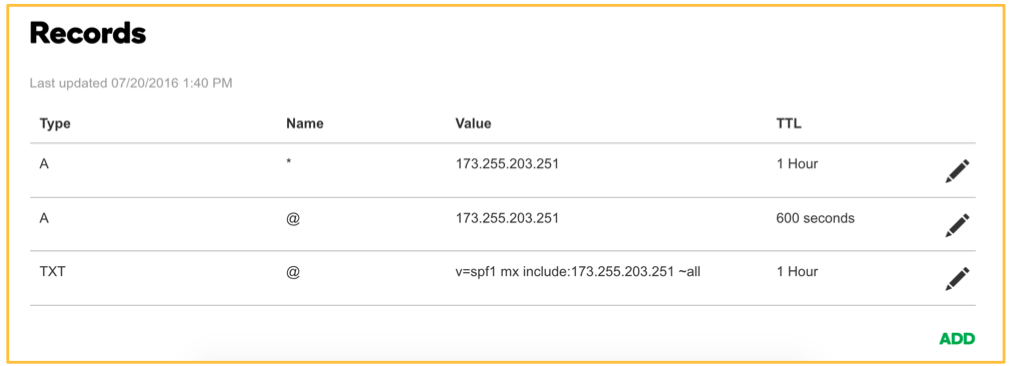
Many agents purchase domains from providers like GoDaddy because the DNS settings are easy to manage.
How-To Purchase a Domain and Domain Name Tips
Can I use a domain that already has another website on it?
No. If a domain is already connected to another website and you point it to your AgentID Site, the original website may stop working.
AgentID Sites are designed to complement your existing websites, not replace them.
We recommend purchasing a separate domain specifically for your AgentID Site.
Listings & Property Pages
Why is my listing photo not displaying?
If your listing photo is missing, you likely need to add a Featured Image.
Each listing requires:
A Featured Image (main display image)
Photos uploaded to the Gallery
Follow the instructions here: How-To Add a Featured Image to Your Listing
Can I showcase my listings on my AgentID Site?
Yes. You can add listings using the property landing page system, which allows you to showcase:
Property photos
Home descriptions
Video tours
Maps
Key home features
These pages are great for:
Just Listed marketing
Social media promotion
Listing presentations
Seller marketing demonstrations
Blog Content
Where do the blog articles come from?
Blog content comes from the Monthly Value Program (MVP) included with your Marketing Club membership.
Each month, we create ready-to-use marketing campaigns that include blog content that can automatically post to your AgentID Site.
You can also create additional blog posts using AI Studio and Blogger AI.
Learn more here: How-To Access Monthly Value Program (MVP) Campaigns
Can I write my own blog posts?
Yes. You can publish your own blog posts anytime.
Many agents use AI Studio's Blogger AI to quickly generate blog content that can then be edited and published to their AgentID Site.
Landing Pages
Where can I find instructions for creating landing pages?
You can find all landing page setup guides here: AgentID Site Landing Pages
What landing page templates are available?
The following landing page templates are currently available:
Home Value Report Landing Page
Unlock the Hidden Real Estate Market Landing Page
Expert Home Analysis Landing Page
Can I customize landing pages?
The Freeform Landing Page allows the most customization.
Other templates allow limited customization, such as:
Market location
Title text
Agent information
Can I use my own photos on landing pages?
Yes. When using the Freeform Landing Page template, you can upload your own photos.
Recommended minimum image size: 1024 × 768 pixels
Leads & Contact Information
How do leads from landing pages work?
When someone submits their contact information on a landing page, the information is sent to the email address connected to your AgentID Site.
The email will contain all the lead information submitted.
Can leads automatically go into my CRM?
At this time, AgentID Sites do not automatically integrate with CRMs.
You will receive the lead information via email and can manually add the contact to your CRM.
Reviews & Social Media
Can I add reviews to my AgentID Site?
Yes. You can display reviews from platforms like Google, Zillow, or Facebook on your AgentID Site to build trust with potential clients. How-To Add Reviews to Your AgentID Site
How do I add social media links?
Follow the instructions here: How-To Add or Change Your Social Media Links
Site Customization
Where can I add my company logo or legal disclosures?
You can add your company logo, brokerage information, and legal disclosures (such as IABS) in the footer section of your AgentID Site.
How do I change my AgentID Site photo?
Follow the instructions here: Updating Your AgentID Site Photo
What image sizes work best?
Images larger than 150px generally work well.
The system automatically resizes images to fit the layout.
Technical Questions
Do AgentID Sites support MLS or IDX integration?
AgentID Sites do not currently support MLS or IDX integration.
They are designed primarily as:
Marketing websites
Listing showcase pages
Lead generation hubs
Content publishing sites
Do AgentID Sites have an RSS feed?
Yes. Add /feed to the end of your AgentID Site URL.
Example: yourname.myagent.site/feed
Can I install plugins or custom code?
No. AgentID Sites use a shared template system, which ensures stability and consistent performance across all sites.
Because of this, custom plugins or code cannot be installed.
Account Support
My AgentID Site name or URL is incorrect. How can I change it?
If your AgentID Site domain needs to be updated, email: support@thepaperlessagent.com
Please include:
Your current domain
The name you want it changed to
Can I change my domain name after the site is created?
Yes. If you want to change or update your domain name, email: support@thepaperlessagent.com
You can also connect a custom domain if you prefer a branded URL.
Where can I find more AgentID Site help articles?
You can view the full collection of AgentID Site support articles here: AgentID Site Solutions
Was this article helpful?
That’s Great!
Thank you for your feedback
Sorry! We couldn't be helpful
Thank you for your feedback
Feedback sent
We appreciate your effort and will try to fix the article